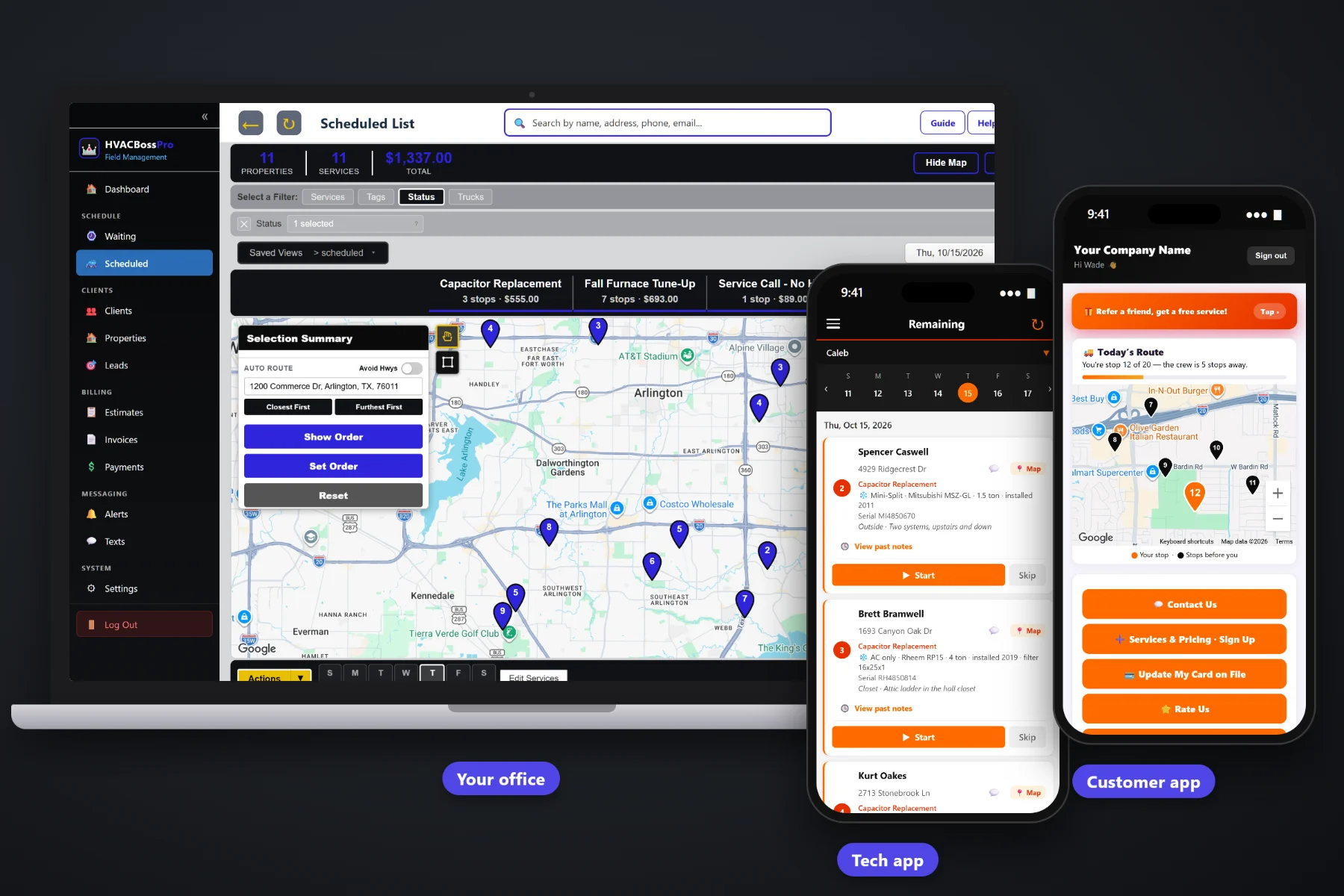
A small heating and air company lives on three kinds of work: no-heat and no-cool service calls, maintenance agreement tune-ups twice a year, and the replacement jobs that come out of both. HVACBossPro keeps all of it in one place, from the first phone call to the paid invoice: clients and equipment, the Waiting List of tune-ups that came due, a dispatch board by van and day, a tech app on every phone, customer texts, and card-on-file billing.
Plans start at $59/month and every plan runs the whole business: clients, equipment, tune-ups, dispatch, the tech app, texting and billing. To see the full platform, start at HVACBossPro. This page is about the owner's side: starting out, pricing, seasons, hiring, growth and the weekly habits that keep a small HVAC company profitable.
System type, brand, model, serial, tonnage, filter size and unit location, entered once and shown on every visit after.
Set 180 days for spring and fall or 365 for yearly. Due tune-ups land on the Waiting List map without anyone keeping a calendar.
One van on repair calls, one on tune-ups. Filter by van, auto-route from the shop and drag work between days.
Calls in route order, equipment and access notes, photos, Start / Skip / Complete and payment at completion.
Night-before, on-the-way and arrived texts, two-way texting with the office, and a customer app with a live route map.
Invoices with sales tax, card on file, auto-charge on completion, past-due follow-up and monthly statements for property managers.
Most HVAC owners start out as the best tech in the company and the only person who knows where everything is. HVACBossPro moves that knowledge out of your head and onto the client record, so a second tech, a part-time office helper or you on a Sunday night can see the whole business in a few screens.
The big enterprise HVAC platforms are built for companies with a call center and a training department. A shop with one to five vans needs the calls, the tune-ups, the techs and the money in one place, set up by the owner in an evening and learned by the techs in a morning.
Add clients by hand or by CSV import. Imported addresses are placed on the map automatically, and each address can hold its own equipment.
Diagnostic, tune-up, maintenance plan, capacitor, contactor, drain line, refrigerant per lb, blower motor, thermostat and whatever else you sell, at your prices.
Each employee gets a personal PIN and a van. Set a maintenance plan to 180 or 365 days and tune-ups come due on their own.
Dispatch from the board, techs work the calls from their phones, customers get their texts and the invoice is created at Complete.
The owner remembers which customers are on a maintenance plan, which attic has the bad ladder and which furnace is a 2012 unit with a 16x25x1 filter. That works with one van. It stops working the day a second tech starts or the owner takes a week off.
Ask an HVAC owner where the money goes missing and you will hear the same list: a diagnostic that never made it onto the invoice, a fall tune-up nobody called to book, a card that declined three weeks ago and nobody noticed, and a tech who drove to the supply house twice because nobody wrote down the filter size.
None of that is a skill problem. It is a records problem. When the equipment, the agreement and the billing live on the client record, the next step happens whether or not the owner remembers it.
HVACBossPro keeps the customer, the address, the equipment, the job and the invoice together, from the first estimate to the last payment.
Every tool here exists to keep a small HVAC company booked, organized and paid, through the summer rush and the slow weeks in between.
One client with many addresses, tags like Maintenance Plan, Commercial and VIP, and your own custom fields.
System type, brand, model, serial, year installed, tonnage, filter size, unit location and access notes on each address.
Minimum days between visits: 180 for spring and fall, 365 for yearly. Tune-ups come due on their own.
Every due tune-up on a live map, colored not due yet, due now, or overdue past a 7-day grace.
Jobs by day, filter by van, auto-route Closest First or Furthest First from the shop, drag work between days.
Company login and PIN, calls in route order, navigation, equipment details, photos, Start / Skip / Complete.
Built from your service list, approved online, and turned into the scheduled job. Follow-up emails go out on their own.
Website request and sign-up forms flow into Form Responses. One click turns a sign-up into a client.
Text customers from the office, plus automated reminders and alerts by text and email.
Live route map, service requests, plan sign-ups, card updates, invoices, online payment, ratings and referrals.
Auto-charge on completion or on a schedule, online payment, and past-due follow-up.
A property manager set to Monthly gets one statement covering every home or building, each line labeled with its address.
Techs clock in on the phone and crew locations show on the office map.
Office user roles plus employees with their own PINs and van assignments.
Works in the US, Canada, Australia, New Zealand and the UK, billing customers in their own currency.
Start $59, Pro $89 and Crew $199 per month, with a 14-day free trial and no credit card.
The jump from one van to two is where most small HVAC companies feel the strain. Calls get double-booked, tune-ups slip and nobody is sure which tech has the serial number. With HVACBossPro the office splits the work by van: repair calls on one, maintenance agreement tune-ups on the other, each routed from the shop, each tech seeing the same order on the phone. For the full owner's playbook, read Running an HVAC Business: The Complete Guide for Owners With a Few Service Vans.
A maintenance agreement customer who gets a reminder the night before, a text when the tech is on the way and an invoice they can pay from their phone is a customer who renews. The customer app shows their place on today's route, lets them request service, sign up for a plan, update their card, pay invoices, rate the visit and refer a neighbor. Replies come back to the office through two-way texting.
Pick the plan that fits the size of your company. Every plan starts with a 14-day free trial and no credit card.
Compare plans on the pricing page.
Yes. It is built for owners running a few service vans: residential service calls and repairs, maintenance agreement tune-ups, and property managers or commercial buildings with many units. You can start as an owner-operator and add techs and vans as you grow.
Each agreement has a minimum number of days between visits, such as 180 for a spring and fall tune-up or 365 for a yearly visit. When a tune-up comes due it shows on the Waiting List map, colored not due yet, due now or overdue past a 7-day grace, so agreement visits come due without anyone keeping a calendar.
Yes. Clients can be brought in by CSV import, and imported addresses are placed on the map automatically. Equipment details can be added to each address as techs visit.
Invoices are created when a tech taps Complete, with line items and sales tax. You can charge the card on file at completion or on a schedule, customers can pay online in the customer app, and past-due invoices get follow-up. Property managers can be set to one monthly statement.
No. The tech app runs in the browser on iPhone and Android and can be installed to the home screen. Techs sign in with your company login and their own PIN.
Start is $59/month, Pro is $89/month, and Crew is $199/month. Each plan includes a monthly text allowance of 500, 1,000 or 2,000 segments sent and received. Every plan starts with a 14-day free trial and no credit card.
The owner's side is one piece of how HVACBossPro runs a heating and air company. For dispatch, the tech app, estimates, maintenance agreements and billing, see the full HVACBossPro platform overview.
Practical reading on starting out, getting off paper, choosing software, pricing, the work mix, seasons, adding vans, hiring and training techs, customer communication, marketing, reviews, profit leaks, office help and growing the company.
Clients and equipment, tune-ups that come due on their own, dispatch by van, a tech app, customer texts and card-on-file billing in one place. Try HVACBossPro free for 14 days.