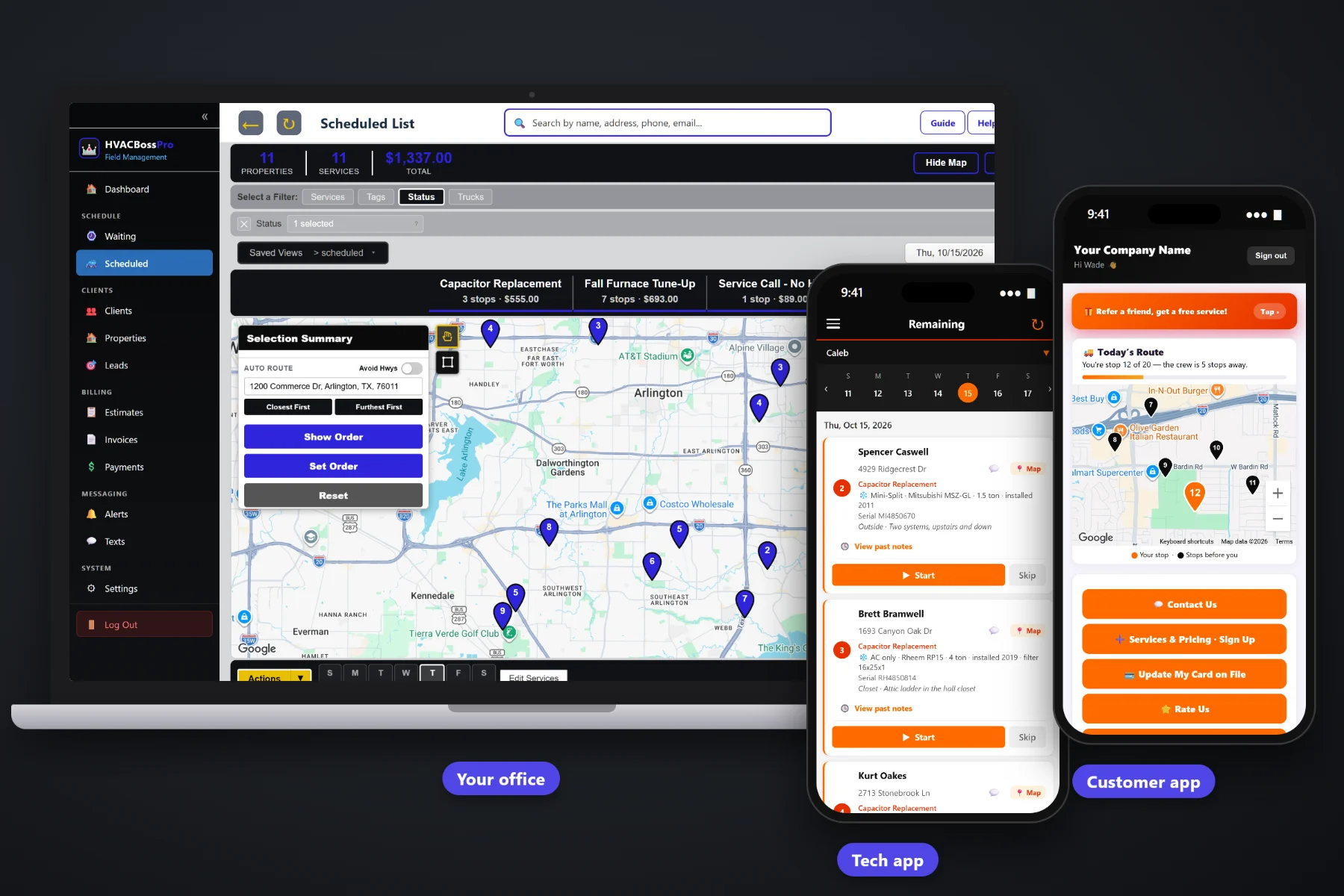
An HVAC day never goes the way it was planned at 7am. A no-cool call comes in at 10, a tune-up customer is not home, and the repair van is across town when the next emergency rings. HVACBossPro puts every van's day on one dispatch board, auto-routes Closest First or Furthest First from the shop, lets you drag calls between days, shows crew GPS on the office map, and sends on-the-way and arrived texts so the office phone stays quieter.
Plans start at $59/month, and the dispatch board comes with every plan. Routing, the Waiting List map, crew GPS, customer texts and the live customer route map are part of the platform, not add-ons. To see how dispatch fits with equipment records, maintenance agreements, estimates and billing, start at HVACBossPro and then dig into scheduling here.
Every service call and tune-up by day and by van. Filter to one truck or see the whole company.
Closest First or Furthest First in one click, then nudge the order by hand where you know better.
A heat wave hits and tune-ups move to Thursday. Drag them, and the techs' phones follow.
Every maintenance visit that came due, on a map colored not due, due now and overdue.
See where each van is on the office map before you promise a customer someone is close.
On-the-way and arrived texts go out from the tech's taps. Customers pick their alerts.
When a homeowner calls with warm air blowing from the vents, the dispatcher needs to know which van has room, which van is closest and what that van is already carrying. HVACBossPro shows each van's calls for the day in route order, with the equipment and access notes on every job, so the answer takes seconds instead of three phone calls to the field.
Most HVAC offices are one or two people answering phones, booking calls and chasing invoices. HVACBossPro keeps dispatch to a board, a map and a few clicks. No consultant, no months of setup, no separate routing program.
Set up employees with a personal PIN and assign them to vans. Bring customers in by CSV import and their addresses land on the map.
Service calls from the phone, the website form or the customer app. Maintenance tune-ups come due on the Waiting List by themselves.
Put jobs on a van and a day, auto-route Closest First or Furthest First, and adjust the order where you know the neighborhood better.
Drag calls between days, watch crew GPS, and read skip notes as they come in. Customers get on-the-way and arrived texts on their own.
HVAC scheduling is two jobs at once: steady, plannable tune-ups and repair calls that show up whenever a capacitor decides to fail. Paper, spreadsheets and generic field-service software tend to handle one of those well and fumble the other.
Ask anyone who has dispatched for a heating and air company during the first hot week of summer. The board was full by Monday. By Tuesday afternoon there were twelve no-cool calls on sticky notes, two techs driving past each other across town, and a stack of spring tune-ups that nobody had the heart to cancel or the time to move.
The fix is not working harder. It is seeing every van's day on one screen, knowing where the vans actually are, and being able to push the plannable work to another day in a couple of drags, while the customers on both lists get told what is happening.
HVACBossPro keeps the board, the map, the equipment and the customer in one place, from the first phone call to the paid invoice.
Every tool here exists to fit more service calls into the day, keep tune-ups from slipping, and answer “when will the tech be here?” before the customer has to ask.
The Scheduled List shows every job by day, with each van's calls in route order.
Look at one truck's day, or every truck at once, without leaving the board.
Closest First or Furthest First from the shop, in one click.
Move a stop up or down when you know something the map does not.
Move a tune-up or a call to another day, and the tech's list follows.
Tune-ups that came due on a live map and list, colored not due, due now and overdue.
Keep one van on service calls and one on maintenance, each with its own route.
System type, brand, model, tonnage, filter size and unit location show with the job.
Attic ladder, gate code, dog and thermostat location live on the address.
Sent automatically from the tech's taps. Customers choose which alerts they get.
In the customer app: "You're stop 12 of 20 — the crew is 5 stops away."
Every van on the office map, so you send the closest one.
Nobody home, no access, needs a part: the tech's note comes back to the office.
Complete creates the invoice and can charge the card on file.
Website requests and customer app service requests land in the office, ready to schedule.
Start $59, Pro $89 and Crew $199 per month, with dispatch on every plan.
Most small HVAC companies settle into the same pattern: one van chases repair calls, another works through maintenance agreement tune-ups, and the owner floats. Tune-ups come due on their own on the Waiting List, from each agreement's minimum days between visits, so the shoulder seasons fill with planned work and the peak weeks stay open for no-cool and no-heat calls. For the full walkthrough, read HVAC Dispatch Software: The Complete Guide to Scheduling Service Calls and Tune-Ups.
The most common call into an HVAC office on a busy day is “is the tech still coming?” HVACBossPro answers it before it is asked. Customers choose a reminder the night before, a text when they are next, and a text when the tech arrives. The customer app shows today's route on a live map with their place in line, and replies come back to the office through two-way texting.
Pick the plan that fits your operation. Every plan starts with a 14-day free trial and no credit card.
Compare plans on the pricing page.
The Scheduled List shows jobs by day. You can filter it to one van or truck, auto-route that van Closest First or Furthest First from the shop, set the route order by hand, and drag jobs to another day. The tech's phone shows the same calls in the same order.
Check crew GPS on the office map to see which van is closest, add the call to that van's day, and set where it falls in the route. If something has to give, drag a tune-up to another day. The tech's list updates, and the customer gets on-the-way and arrived texts as the tech works.
Each agreement has a minimum number of days between visits, such as 180 for spring and fall tune-ups or 365 for a yearly visit. When a visit comes due it shows on the Waiting List map and list, colored not due, due now or overdue, and you assign it to a van and a day from there.
Yes. Customers can choose a text the night before, when they are next, and when the tech arrives. The customer app also shows today's route on a live map, such as "You're stop 12 of 20 — the crew is 5 stops away."
The tech taps Skip and notes why: nobody home, no attic access, needs a part. The office sees the skip with the note and can text the customer and move the job to another day.
Start is $59/month, Pro is $89/month, and Crew is $199/month. Dispatch and routing are on every plan, and every plan starts with a 14-day free trial with no credit card.
Dispatch is one piece of how HVACBossPro runs a heating and air company. For equipment records, maintenance agreements, estimates, the tech app and billing, see the full HVACBossPro platform overview.
Practical reading on the dispatch board, no-cool and no-heat rushes, routing, splitting repair and tune-up vans, the Waiting List, customer texts, crew GPS, skips, after-hours calls and a daily dispatch routine.
One board for every van, auto-routing from the shop, tune-ups that come due on their own, crew GPS and automatic customer texts. Try HVACBossPro free for 14 days.