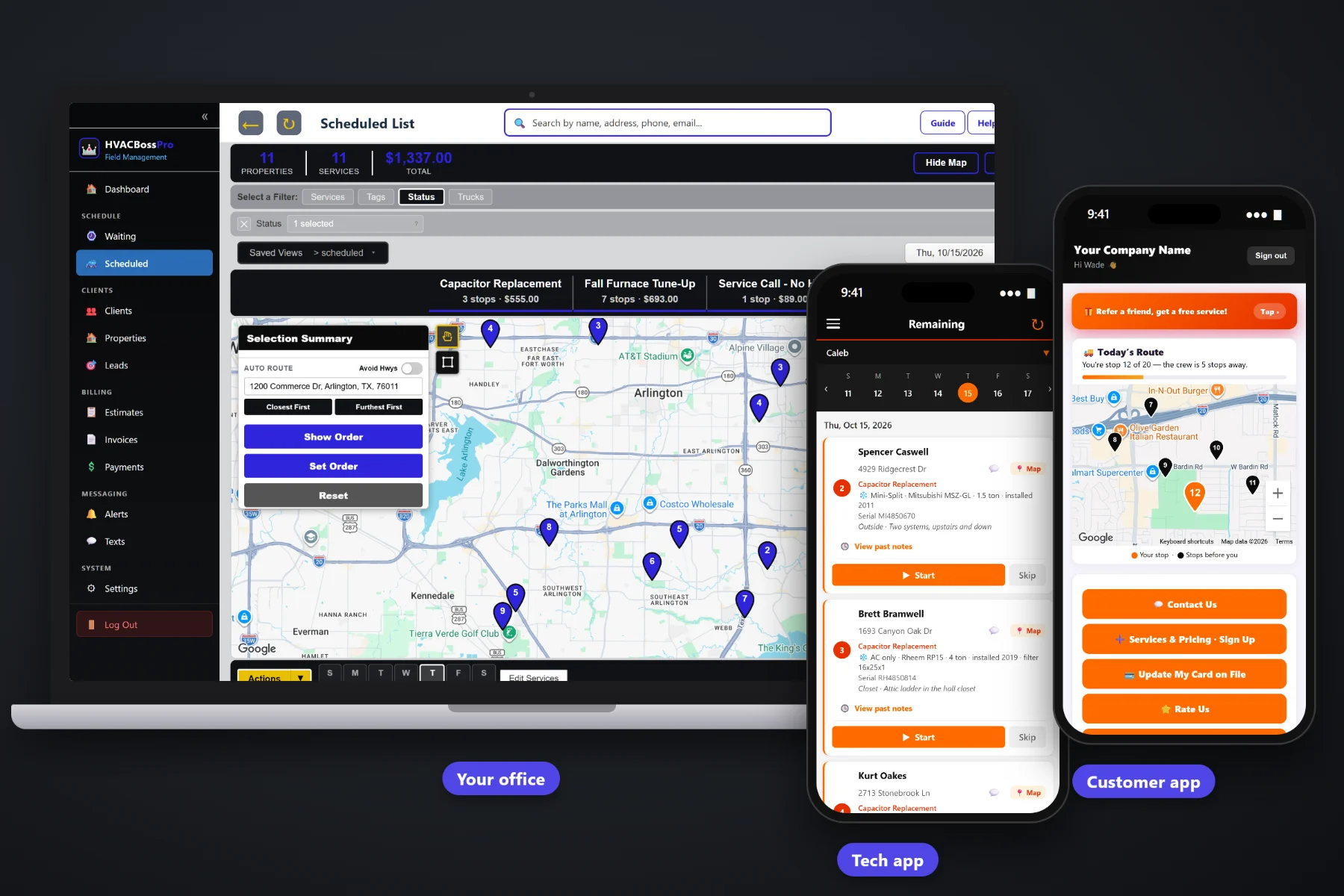
An HVAC quote is a diagnostic, a list of parts and labor, a system with a model and serial number, and a homeowner who wants to think about it overnight. HVACBossPro builds estimates from your own service list, keeps the equipment details on the estimate so they carry onto the job, lets the customer approve online, turns the approved estimate into a scheduled job and sends follow-up emails on the quotes nobody has answered yet.
Plans start at $59/month, and quotes are part of every plan. The service list, estimates, online approval, follow-up emails, request forms and sign-up forms come with the platform, not as an add-on. To see how estimates fit with dispatch, maintenance agreements, the tech app and billing, start at HVACBossPro and then dig into the quoting side here.
Diagnostic, tune-ups, maintenance plan, capacitor, contactor, drain line, refrigerant per pound, blower motor, thermostat, coil cleaning. Your names, your prices.
System type, brand, model, serial, tonnage and filter size filled in on the quote carry onto the job, so the tech walks in knowing the unit.
The customer reads the estimate and approves it online. No phone tag, no signed paper to scan.
An approved estimate becomes the scheduled job, with the lines, the address and the equipment already on it.
Estimate follow-up emails remind customers about quotes they have not answered, so open quotes do not quietly die.
Website requests and plan sign-ups with a card land in Form Responses. One click turns a sign-up into a client.
Whoever ran the diagnostic already knows the unit is a 3-ton heat pump in the attic with a weak capacitor and a slow drain. HVACBossPro puts those findings on a written estimate built from your service list, with sales tax figured, and keeps the equipment details on it. When the customer approves, none of it has to be typed again.
Most HVAC owners write estimates after the last call of the day, from scribbled notes and a price sheet in their head. HVACBossPro keeps the price sheet in the software, so a repair quote is a few lines picked from a list, and the customer has it while the conversation in the driveway is still fresh.
Enter your diagnostic fee, tune-ups, maintenance plan and the repairs you quote every week, each with your own price.
Pick the lines, add options as separate lines, fill in the equipment details and let the software figure the sales tax.
The customer reads the quote and approves it online. Quotes that sit get follow-up emails.
The approved estimate becomes the job on the dispatch board, with the lines and equipment already on it.
Generic field-service software treats an estimate as a page of text. An HVAC estimate is a diagnosis, a set of parts and labor, a piece of equipment with a serial number, and a follow-up that somebody has to remember to make. When those pieces live in different places, jobs slip away.
Ask any heating and air owner where their quotes live and you will hear the same answer: a carbon pad in the truck, a spreadsheet on the office computer, and a few email drafts that never got sent. The homeowner said they would think about it. Nobody called them back. When they finally did say yes, somebody had to retype the address, the parts and the unit details onto a job ticket, and the tech still showed up asking where the air handler was.
That information belongs on one record. When the estimate, the equipment and the job are the same thing, a yes turns into a scheduled job and the tech arrives knowing the filter size.
HVACBossPro keeps the quote, the equipment, the address and the customer together, from the first request on your website to the paid invoice.
Every tool here exists to get a clear quote in front of the customer sooner, get the answer back faster and get the approved work on the schedule without retyping it.
Diagnostic, tune-ups, maintenance plan, capacitor, contactor, drain line, refrigerant per lb, blower motor, thermostat, coil cleaning, and anything else you sell.
Pick lines from the list, adjust quantities, and write clear descriptions the homeowner can follow.
Write a repair and an upgrade as separate lines so the customer sees both choices on one estimate.
System type, brand, model #, serial #, year installed, tonnage, filter size, unit location and access notes.
Equipment filled in on the estimate shows on the job and on every visit after it.
Tax figured on the estimate, so the approved total and the invoice total agree.
Customers approve the estimate online, on their own time.
An approved estimate becomes the scheduled job on the dispatch board.
Estimate follow-up emails go out on quotes the customer has not answered.
Service and quote requests from your website land in Form Responses.
Customers choose a service or maintenance plan and leave a card. It lands in Form Responses.
Turn a sign-up into a client with one click, address and card included.
Property managers get one client record with every rental home or building as its own address.
Quote a plan, and twice-a-year tune-ups come due on the Waiting List on their own.
Two-way texting with customers from the office, plus automated reminders and alerts.
Start $59, Pro $89 and Crew $199 per month, with estimates on every plan.
An approved estimate does not go into a pile for someone to retype later. It becomes the scheduled job, with the lines, the address and the equipment details already on it. The office drops it on a van and a day, auto-routes Closest First or Furthest First from the shop, and the tech sees it on the phone in route order with the system details under the address. For the full walkthrough, read HVAC Estimate Software: The Complete Guide to Quoting Service Calls, Repairs and Replacements.
New customers find you through the request form or the sign-up form on your website, and both land in Form Responses. A sign-up with a card on it becomes a client in one click. Existing customers can request service, sign up for a maintenance plan, update their card and see invoices in the customer app. When you send an estimate, they approve it online, and if they forget, the follow-up emails remind them. Questions come back to the office through two-way texting.
Pick the plan that fits your operation. Every plan starts with a 14-day free trial and no credit card.
Compare plans on the pricing page.
Lines picked from your own service list, such as a diagnostic, a tune-up, a maintenance plan, a capacitor, a contactor, a drain line clearing, refrigerant per pound, a blower motor, a thermostat or a coil cleaning, each with your price and a clear description. Sales tax is figured on the estimate, and the equipment details for the system can be filled in right on it.
The customer approves the estimate online. There is no paper to sign and scan, and nobody has to catch them on the phone. If they have not answered, estimate follow-up emails remind them.
The approved estimate becomes the scheduled job. The lines, the address and the equipment details are already on it, so the office only has to pick a van and a day, and the tech sees the job on the phone in route order.
Yes. Many HVAC companies write a repair and one or two upgrade choices as separate lines on the estimate, or send separate estimates, so the customer can compare. You decide how you present options; the software holds whatever lines you write.
Both the website request form and the sign-up form land in Form Responses. The sign-up form captures a card, and one click converts a sign-up into a client with their address and plan.
Start is $59/month, Pro is $89/month, and Crew is $199/month. Estimates are on every plan, and every plan starts with a 14-day free trial with no credit card.
Estimates are one piece of how HVACBossPro runs a heating and air company. For dispatch, maintenance agreements, the tech app, property manager accounts and billing, see the full HVACBossPro platform overview.
Practical reading on building a service list, pricing the diagnostic, quoting repairs and replacements, options, maintenance plans, equipment details, sales tax, online approval, follow-ups, property managers, request and sign-up forms, and choosing estimate software.
Estimates from your own service list, equipment details that carry onto the job, online approval, follow-up emails and approved quotes that turn into scheduled jobs. Try HVACBossPro free for 14 days.